How it works
A spoiler-free manga reader for your own chapters
OnePanel Reader turns comic files, page images, and OP Chapters or TCB links into a panel-by-panel reading flow, so every reveal lands exactly when you get to it. Standard panel detection is free.
Why manga scans spoil themselves
Full-page scans show too much at once
A single scanned page often contains three, four, or more panels. Your eyes land on the next reveal before you have finished reading the current one.
Wide screens make it worse
On a tablet or desktop monitor, a full manga page sits small in the middle of a lot of empty space, and the panels below the one you are reading are easy to see out of the corner of your eye.
Scrolling ruins pacing
Scrolling past a page to get to the next one frequently flashes the top of the following page, which is exactly where the next chapter's twist tends to live.
Full page scan
Your eye got here first
How OnePanel Reader fixes it
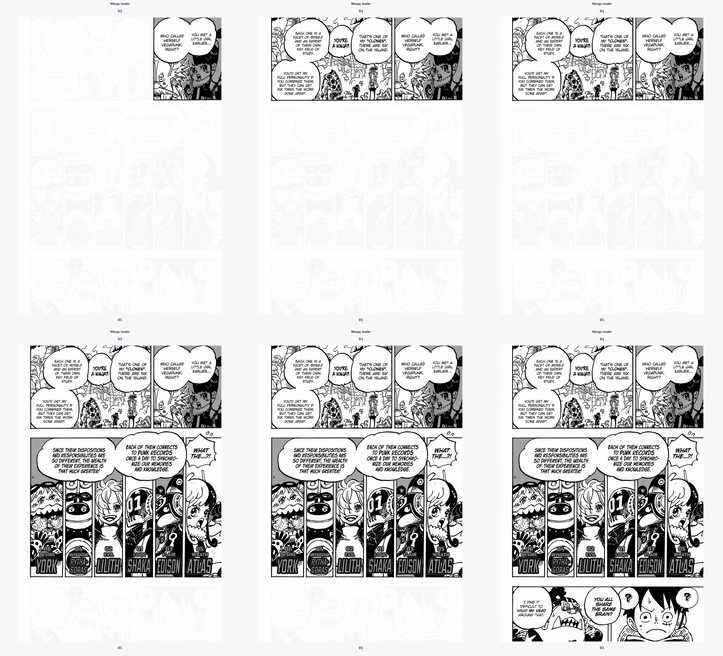
- 01
Bring your own chapter
Upload a CBZ, CBR, ZIP, RAR, or PDF comic, select multiple page images, or paste an OP Chapters or TCB link.
- 02
OnePanel builds a panel-by-panel flow
The chapter is split into individual panels in reading order, one reveal per screen.
- 03
Read at your own pace
Move forward and back with the left and right arrow keys. Nothing past the current panel is on screen.
Read from the source you already have
Import a comic archive or PDF, choose page images from your device, or paste a chapter URL from OP Chapters or TCB One Piece Chapters. Uploaded files require an account and are deleted after analysis; only the panel layout remains for the current browser session. Standard mode is free, while OnePanel Pro adds GPT‑5.6 Layout for complex pages. See the FAQ for details.
Ready to keep the next reveal off-screen?
Bring a chapter and start reading it one panel at a time.